
Blossom Monogram Blue Font Free Download – Windows, Mac, Linux
Introducing Blossom Monogram Blue Font: Elevate Your Designs with Floral Elegance
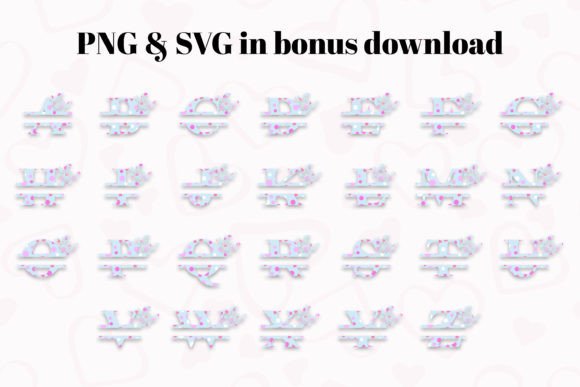
Are you looking for a font that adds a touch of nature’s beauty to your designs? Look no further than Blossom Monogram Blue Font. This delightful monogram font is adorned with charming blossoms, making it perfect for personalizing and adding a unique flourish to your projects. With its soothing blue hue and graceful blooms, Blossom Monogram Blue effortlessly combines elegance and simplicity, making it an ideal choice for creating stylish monograms that stand out.
📸 Font Preview Gallery
Commercial license included • Instant download • No registration required
The Beauty of Blossom Monogram Blue
Blossom Monogram Blue Font is a beautiful addition to any design project. The font features charming blossoms that add a touch of floral finesse to your letters. The soothing blue hue gives the font a calming and serene feel, making it perfect for designs that require a sense of elegance and sophistication. The font’s graceful blooms are intricately designed, adding a level of detail and refinement to your monograms.
Perfect for Designers and Crafters
Blossom Monogram Blue Font is perfect for designers and crafters who want to add a personal touch to their projects. The font is ideal for creating stylish monograms, personalized gifts, and beautiful stationery. Whether you’re a professional designer or a crafter, Blossom Monogram Blue is a versatile font that can be used in a variety of projects, from wedding invitations to DIY home decor.
Compatibility and Usage
Blossom Monogram Blue Font is compatible with various design programs, including PhotoShop, Illustrator, Silhouette, and Inkscape. However, it’s essential to note that the color version of this font is only compatible with certain design programs. The OTF and/or TTF files of the color version are not compatible with Cricut Design Space and other cutting machines. But don’t worry, the black version of this font is compatible with Cricut Design Space and other cutting machines.
Tips for Using Blossom Monogram Blue Font
To get the most out of Blossom Monogram Blue Font, here are some tips:
- Use the font to create personalized gifts, such as monogrammed towels, mugs, and wall art.
- Pair the font with other floral designs or patterns to create a cohesive look.
- Experiment with different colors and textures to add depth and interest to your designs.
- Use the font to create beautiful stationery, including wedding invitations, greeting cards, and thank-you notes.
How to Use Blossom Monogram Blue Font in Your Designs
Using Blossom Monogram Blue Font in your designs is easy. Here’s a step-by-step guide:
- Download and install the font on your computer.
- Open your design program and select the font from your font library.
- Type in your text and adjust the font size and style to suit your design.
- Experiment with different colors and textures to add depth and interest to your design.
- Save your design and use it in your project.
Blossom Monogram Blue Font: Access Download Now
| Font Name | Blossom Monogram Blue Font |
| Author | Paper Daisy Graphics |
| Download | Access Download Here |
Conclusion
Blossom Monogram Blue Font is a beautiful and versatile font that adds a touch of floral elegance to your designs. With its soothing blue hue and charming blossoms, this font is perfect for designers and crafters who want to create stylish monograms and personalized gifts. Whether you’re a professional designer or a crafter, Blossom Monogram Blue is a great addition to your font library.
For more information on how to use Blossom Monogram Blue Font, including tutorials and design inspiration, check out our Ultimate Font Guide. Happy designing!