
Halloween Pumpkin Font Free Download – Windows, Mac, Linux
Halloween Pumpkin Font: The Ultimate Decorative Font for Spooky Designs
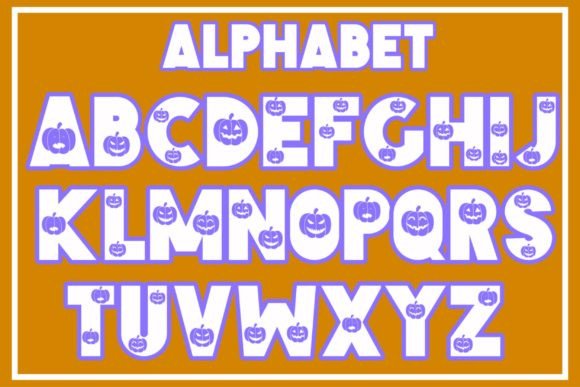
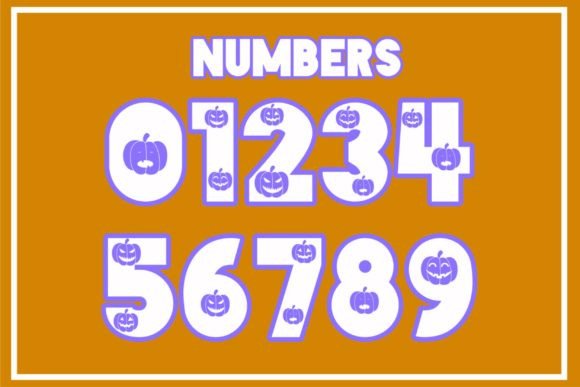
Are you looking for a unique and creative way to add a spooky touch to your Halloween designs? Look no further than the Halloween Pumpkin Font! This cool decorative font is perfect for the Halloween season and is designed to have various faces of pumpkins on letters, making it a standout addition to any design.
📸 Font Preview Gallery
Commercial license included • Instant download • No registration required
What is Halloween Pumpkin Font?
Halloween Pumpkin Font is a specially designed font that features adorable pumpkin faces on each letter. The font is carefully crafted to bring a playful and festive touch to your designs, making it ideal for Halloween-themed projects. The unique pumpkin design on each letter adds a creative and eye-catching element to your text, making it perfect for designs that require a bold and attention-grabbing style.
Why Use Halloween Pumpkin Font?
There are many reasons why Halloween Pumpkin Font is a must-have for designers and crafters. Here are just a few:
- Unique and Creative: The Halloween Pumpkin Font is a one-of-a-kind font that will add a unique touch to your designs. The pumpkin faces on each letter are carefully designed to be both cute and spooky, making it perfect for Halloween-themed projects.
- Perfect for Halloween Designs: The font is specifically designed for the Halloween season, making it a great addition to any design that requires a spooky or festive touch.
- Easily Customizable: The Halloween Pumpkin Font is easy to use and customize, allowing you to adjust the font size, color, and style to fit your design needs.
- Great for Various Design Projects: The font can be used for a variety of design projects, including invitations, posters, flyers, and more.
How to Use Halloween Pumpkin Font?
Using Halloween Pumpkin Font is easy! Here are the steps:
- Download the Font: Simply download the Halloween Pumpkin Font from a reputable font website or market.
- Install the Font: Install the font on your computer or device.
- Choose Your Design Software: Open your design software, such as Adobe Illustrator or Canva.
- Select the Font: Select the Halloween Pumpkin Font from your font library.
- Customize Your Text: Customize your text by adjusting the font size, color, and style to fit your design needs.
Design Ideas Using Halloween Pumpkin Font
The Halloween Pumpkin Font can be used for a variety of design projects. Here are some ideas to get you started:
- Halloween Invitations: Create spooky and fun invitations for Halloween parties or events.
- Pumpkin-Themed Posters: Design eye-catching posters featuring the Halloween Pumpkin Font.
- Halloween Flyers: Create flyers for Halloween events or parties using the Halloween Pumpkin Font.
- Social Media Graphics: Use the font to create spooky and engaging social media graphics for Halloween.
Tips and Tricks for Using Halloween Pumpkin Font
Here are some tips and tricks for using the Halloween Pumpkin Font:
- Experiment with Colors: Try out different colors and combinations to make your design stand out.
- Mix and Match Fonts: Combine the Halloween Pumpkin Font with other fonts to create a unique and creative design.
- Add Graphics and Images: Add graphics and images to enhance your design and make it more visually appealing.
In conclusion, the Halloween Pumpkin Font is a must-have for designers and crafters looking to add a spooky and creative touch to their Halloween designs. With its unique pumpkin faces on each letter, this font is sure to make your designs stand out. Whether you’re creating invitations, posters, or social media graphics, the Halloween Pumpkin Font is the perfect addition to your design toolkit.
Halloween Pumpkin Font: Access Download Now
| Font Name | Halloween Pumpkin Font |
| Author | CHEETAH DOODLE |
| Download | Access Download Here |