
16 Segment Display Font Free Download – Windows, Mac, Linux
Introducing the 16 Segment Display Font: A Retro-Inspired Color Font
Are you looking for a unique and nostalgic font to add a touch of retro flair to your designs? Look no further than the 16 Segment Display Font! This innovative color font emulates the segment displays commonly used in old VCRs, CD players, and clock radios, bringing a blast from the past to your modern designs.
📸 Font Preview Gallery
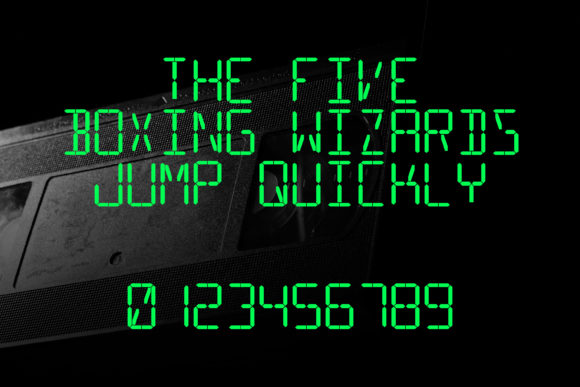
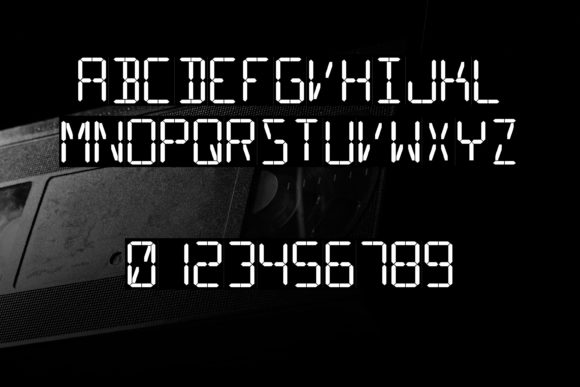
Commercial license included • Instant download • No registration required
What is a 16 Segment Display Font?
The 16 Segment Display Font is a specially designed color font that mimics the aesthetic of old-school segment displays. These displays, often used in electronic devices from the 80s and 90s, feature a series of illuminated segments that form numbers, letters, and sometimes even simple symbols. Our font brings this retro look to your digital designs, allowing you to create eye-catching and nostalgic text elements.
Key Features of the 16 Segment Display Font
- Color Font (Opentype-SVG): Unlike traditional black and white fonts, our 16 Segment Display Font is a color font, allowing for vibrant and detailed rendering of each segment.
- Compatibility: This font is compatible with popular design software such as PhotoShop, Illustrator, Silhouette, and Inkscape, making it versatile for various design applications.
- Not Compatible with Cricut: Note that the OTF and/or TTF files of this product are not compatible with Cricut machines. For guidance on using this font with Cricut, please refer to our Ultimate Font Guide.
Using the 16 Segment Display Font: Tips and Tricks
To get the most out of this unique font, here are some tips and tricks for using the 16 Segment Display Font in your designs:
- Experiment with Colors: Take advantage of the color font capabilities by experimenting with different color schemes. You can match the colors to your brand palette or go for a bold, retro-inspired look.
- Mix and Match: Combine the 16 Segment Display Font with other fonts or design elements to create interesting contrasts and visual hierarchies.
- Pay Attention to Legibility: While the font is designed to be nostalgic, ensure that your text remains legible, especially at smaller sizes.
Creative Applications of the 16 Segment Display Font
The 16 Segment Display Font is versatile and can be used in a variety of creative projects, including:
- Graphic Design: Add a retro touch to your posters, flyers, and brochures.
- Digital Art: Incorporate the font into your digital illustrations or pixel art for a nostalgic feel.
- Crafting: Use the font in your cutting files for unique and personalized crafts, such as custom vinyl decals or iron-on designs.
- Web Design: Use the font to create eye-catching headings or quotes on your website, adding a touch of personality to your online presence.
Getting Started with the 16 Segment Display Font
Ready to bring a touch of retro nostalgia to your designs? Here’s how to get started:
- Download the Font: Purchase and download the 16 Segment Display Font from our website.
- Install the Font: Follow the installation instructions for your operating system to make the font available in your design software.
- Consult the Ultimate Font Guide: For detailed instructions on how to use the font, especially if you’re new to color fonts or SVG fonts, check out our Ultimate Font Guide.
16 Segment Display Font: Access Download Now
| Font Name | 16 Segment Display Font |
| Author | thorchristopherarisland |
| Download | Access Download Here |
Conclusion
The 16 Segment Display Font is a unique and versatile tool for designers and crafters looking to add a retro flair to their projects. With its compatibility with major design software and its vibrant color capabilities, this font is sure to inspire creativity and nostalgia in your designs. So why wait? Download the 16 Segment Display Font today and start creating stunning, retro-inspired designs!