
Arrow Brush Font Free Download – Windows, Mac, Linux
Unlock Creative Potential with Arrow Brush Font: A Hand-Drawn Dingbat Delight
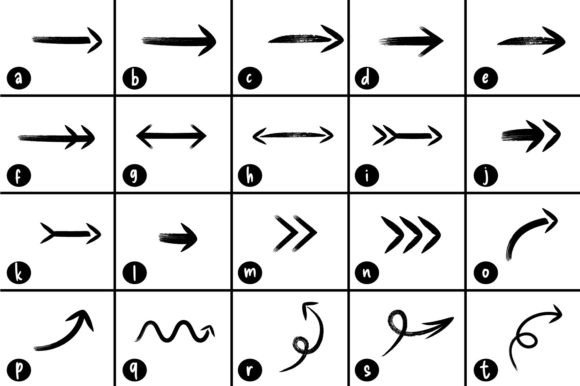
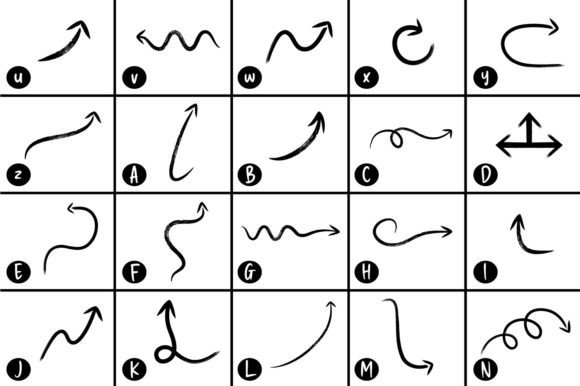
Are you a designer, crafter, or DIY enthusiast looking to add a personal touch to your projects? Look no further than the Arrow Brush Font, a unique collection of hand-drawn dingbats that can elevate your designs and plans to the next level. In this article, we’ll explore the world of Arrows brush dingbats font, their versatility, and how they can help you create outstanding designs.
📸 Font Preview Gallery
Commercial license included • Instant download • No registration required
What are Dingbats?
Dingbats are a type of font that consists of symbols, icons, and graphics rather than traditional alphabet letters. They are often used to add visual interest and personality to designs, making them perfect for creative projects. The Arrow Brush Font takes dingbats to the next level with its hand-drawn, brush-stroke style arrows that exude a sense of organic charm.
The Arrow Brush Font Advantage
So, what sets the Arrow Brush Font apart from other dingbat fonts? Here are a few advantages that make it a must-have for designers and crafters:
- Hand-drawn authenticity: Each arrow in the Arrow Brush Font is carefully hand-drawn, giving it a unique, organic feel that sets it apart from more generic, computer-generated dingbats.
- Versatility: The Arrow Brush Font can be used for a wide range of projects, from graphic design and illustration to crafting and DIY plans.
- Customizable: With the Arrow Brush Font, you can easily customize your designs by adjusting the size, color, and style to fit your project’s needs.
Using Arrow Brush Font in Your Designs
The possibilities are endless when it comes to using the Arrow Brush Font in your designs. Here are a few ideas to get you started:
- Decorate your designs: Add a touch of personality to your designs with the Arrow Brush Font’s hand-drawn arrows. Use them as accents, borders, or even as a focal point.
- Enhance your plans: Whether you’re creating DIY plans, woodworking projects, or crafting tutorials, the Arrow Brush Font can help illustrate your ideas and make them more engaging.
- Create unique graphics: Use the Arrow Brush Font to create one-of-a-kind graphics, such as logos, icons, or social media graphics.
Tips and Tricks for Working with Arrow Brush Font
To get the most out of the Arrow Brush Font, here are a few tips and tricks to keep in mind:
- Experiment with colors: Try pairing the Arrow Brush Font with different colors and textures to add depth and interest to your designs.
- Mix and match: Combine the Arrow Brush Font with other fonts and graphics to create unique and eye-catching designs.
- Pay attention to scale: Make sure to adjust the size of the arrows to fit your design’s proportions and style.
Arrow Brush Font: Access Download Now
| Font Name | Arrow Brush Font |
| Author | LudraDesign |
| Download | Access Download Here |
Conclusion
The Arrow Brush Font is a powerful tool for designers, crafters, and DIY enthusiasts looking to add a personal touch to their projects. With its hand-drawn, brush-stroke style arrows, this dingbat font offers a unique and versatile way to elevate your designs and plans. Whether you’re looking to decorate your designs, enhance your plans, or create unique graphics, the Arrow Brush Font is the perfect choice. So why wait? Unlock your creative potential with the Arrow Brush Font today!
Download the Arrow Brush Font now and start creating outstanding designs that showcase your personality and style!