
Autumn Font Free Download – Windows, Mac, Linux
Introducing Autumn Font: Add a Touch of Warmth to Your Designs
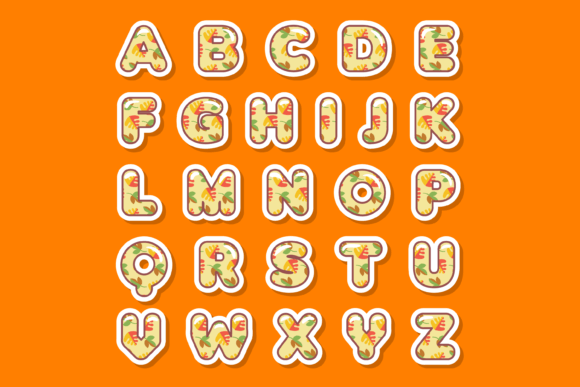
As the seasons change and autumn leaves start to fall, designers and crafters are on the lookout for inspiration to add a warm and cozy touch to their creations. If you’re looking for a font that captures the essence of autumn, look no further than the Autumn Font. This beautifully designed color font is perfect for custom designs, DIY crafts, and any project that requires a lovely and seasonal touch.
📸 Font Preview Gallery
Commercial license included • Instant download • No registration required
What Makes Autumn Font So Special?
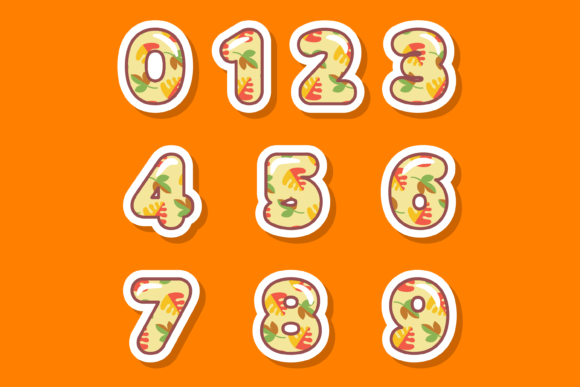
The Autumn Font is an incredibly cool color font designed in the style of leaves, with intricate details and vibrant colors that evoke the feeling of crunching through a pile of fallen leaves on a crisp autumn day. The font is available in Opentype-SVG format, making it compatible with a range of popular design software, including PhotoShop, Illustrator, Silhouette, and Inkscape.
Technical Details: Compatibility and File Formats
Before purchasing the Autumn Font, it’s essential to note that this product is a color font (Opentype-SVG) and is compatible with the following software:
- PhotoShop
- Illustrator
- Silhouette
- Inkscape
However, the OTF and TTF files of this product are not compatible with Cricut. If you’re a Cricut user, don’t worry! Our Ultimate Font Guide provides detailed information on how to use this type of font with your machine.
Uses for Autumn Font: Endless Creative Possibilities
The Autumn Font is perfect for a wide range of creative projects, including:
- Custom designs: Add a personal touch to your designs with this beautiful and unique font.
- DIY crafts: Use the Autumn Font to create personalized gifts, cards, and decorations for your home.
- Seasonal projects: Get into the autumn spirit with font-based projects, such as invitations, posters, and social media graphics.
Tips for Using Autumn Font in Your Designs
To get the most out of the Autumn Font, here are a few tips to keep in mind:
- Experiment with different colors: While the font comes in a range of autumn-inspired colors, feel free to get creative and try out different color combinations to match your brand or design style.
- Mix and match with other fonts: The Autumn Font works beautifully with other fonts, so don’t be afraid to pair it with your favorite serif or sans-serif fonts to create a unique look.
- Use it for headlines and titles: The Autumn Font is perfect for headlines and titles, where its intricate details and vibrant colors can really shine.
Getting Started with Autumn Font: A Step-by-Step Guide
Ready to start using the Autumn Font in your designs? Here’s a step-by-step guide to get you started:
- Download the font files: Once you’ve purchased the Autumn Font, download the font files to your computer.
- Install the font: Follow the installation instructions for your design software to install the font.
- Open your design software: Launch PhotoShop, Illustrator, Silhouette, or Inkscape, and create a new project.
- Select the Autumn Font: Choose the Autumn Font from your font library and start typing away!
Autumn Font: Access Download Now
| Font Name | Autumn Font |
| Author | JUSTTYPE |
| Download | Access Download Here |
Conclusion
The Autumn Font is a beautiful and unique color font that’s perfect for designers and crafters looking to add a touch of warmth and coziness to their creations. With its intricate details and vibrant colors, this font is sure to inspire a range of creative projects, from custom designs and DIY crafts to seasonal projects and more. So why wait? Download the Autumn Font today and start creating!