
Bird Feathers Font Free Download – Windows, Mac, Linux
Bird Feathers Font: The Ultimate Choice for Scoring, Sketching, and Foil Quilling Projects
Are you looking for a unique and quirky font to elevate your next crafting project? Look no further than the Bird Feathers Font! This hairline font is specifically designed for use with scoring, sketch pens, and foil quills, making it the perfect choice for crafters and designers who want to add a touch of elegance and whimsy to their work.
📸 Font Preview Gallery
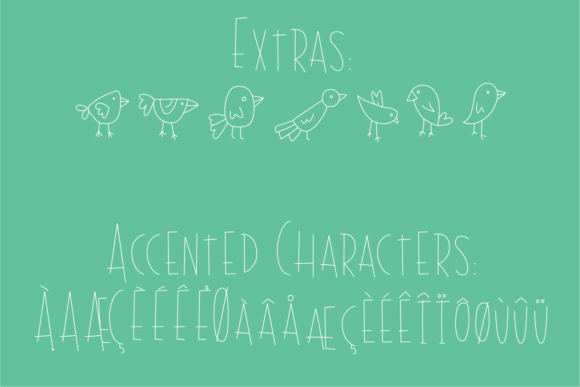
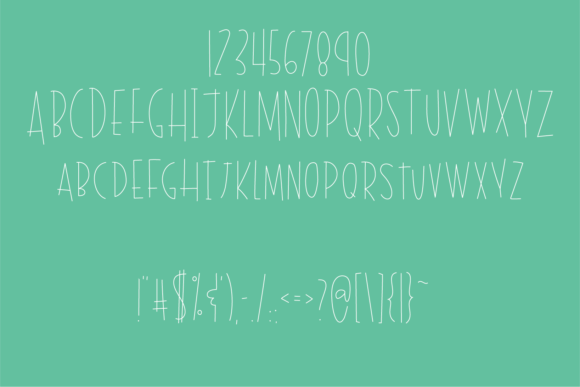
Commercial license included • Instant download • No registration required
What Makes Bird Feathers Font So Special?
The Bird Feathers Font is unlike any other font on the market. Its unique hairline design makes it perfectly thin for use with cutting-edge crafting tools like Glowforge, Silhouette, or Cricut. This means that you can achieve a solid letter without any center voids, simply by setting your program to no-fill and adding a line color. The result is a beautifully crafted design that’s sure to impress.
Inspired by the letters of the Blackbird font, the Bird Feathers Font was specifically designed for scoring and sketch tools. This means that it’s optimized for use with a variety of crafting techniques, from scoring and sketching to foil quilling. Whether you’re a seasoned crafter or just starting out, this font is sure to become a favorite in your collection.
Why Does Bird Feathers Font Look Different in Font Previewers?
It’s worth noting that the Bird Feathers Font may look off in font previewers. This is because it was specifically designed for use with scoring, sketch pens, and foil quills, rather than for print. The font’s hairline design can be tricky to render accurately in font previewers, but trust us – the end result is well worth it.
Tips for Using Bird Feathers Font in Your Projects
So how can you get the most out of the Bird Feathers Font? Here are a few tips to get you started:
- Use it with Glowforge, Silhouette, or Cricut: These cutting-edge crafting tools are perfect for use with the Bird Feathers Font. Simply set your program to no-fill, add a line color, and you’ll achieve a solid letter without any center voids.
- Experiment with different line colors: The Bird Feathers Font looks amazing with a variety of line colors. Try experimenting with different colors and thicknesses to find the perfect look for your project.
- Pair it with other fonts: The Bird Feathers Font pairs beautifully with other fonts, especially those with a bold or serif design. Try pairing it with a contrasting font to add visual interest to your project.
The Benefits of Using Bird Feathers Font in Your Designs
So why should you choose the Bird Feathers Font for your next project? Here are just a few benefits of using this unique and versatile font:
- Add a touch of whimsy: The Bird Feathers Font has a playful, whimsical design that’s sure to add a touch of personality to your project.
- Perfect for crafting and DIY projects: This font is specifically designed for use with scoring, sketch pens, and foil quills, making it the perfect choice for crafters and DIY enthusiasts.
- Easily customizable: The Bird Feathers Font is easy to customize, whether you want to change the line color, thickness, or style.
Bird Feathers Font: Access Download Now
| Font Name | Bird Feathers Font |
| Author | kitaleigh |
| Download | Access Download Here |
Conclusion
In conclusion, the Bird Feathers Font is a unique and versatile font that’s perfect for crafters, designers, and DIY enthusiasts. Its hairline design makes it perfectly thin for use with scoring, sketch pens, and foil quills, while its whimsical style adds a touch of personality to any project. Whether you’re looking to create a beautiful piece of art or a functional crafting project, the Bird Feathers Font is the perfect choice.
So why wait? Download the Bird Feathers Font today and start creating your next masterpiece!