
Candy Font Free Download – Windows, Mac, Linux
Candy Font: Add a Sweet Touch to Your Designs
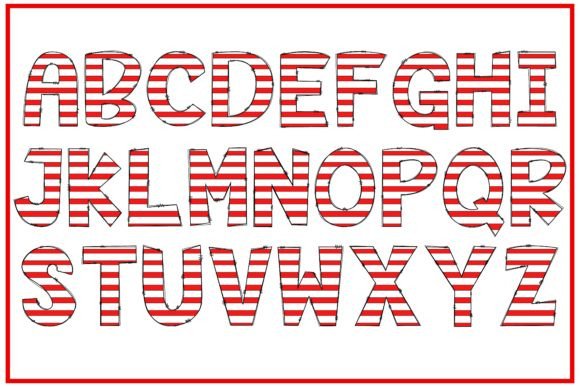
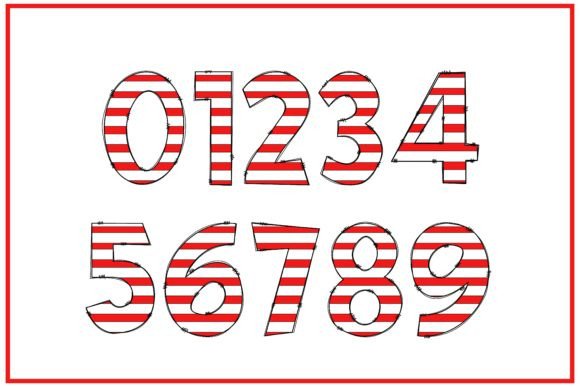
Are you looking for a font that can add a playful and festive touch to your designs? Look no further than the Candy Font! This incredibly cool color font is decorated with typical Christmas candies, making it perfect for the holiday season. But don’t worry, its appeal goes beyond just Christmas – it’s a great addition to any design that requires a lovely and whimsical touch.
📸 Font Preview Gallery
Commercial license included • Instant download • No registration required
What is Candy Font?
Candy Font is a unique and colorful font that features illustrations of Christmas candies. It’s a type of OpenType-SVG font, which means it’s a color font that can be used in various design software. The font comes in OTF and TTF file formats, making it compatible with popular design tools like PhotoShop, Illustrator, Silhouette, and Inkscape.
What Can I Use Candy Font For?
The possibilities are endless with Candy Font! Here are some ideas to get you started:
- Custom designs: Add a personal touch to your designs, whether it’s for a holiday card, invitation, or gift tag.
- DIY crafts: Use Candy Font to create beautiful and unique craft projects, such as paper cutouts, iron-on designs, or vinyl decals.
- Party decorations: Create festive party decorations, such as banners, garlands, or cupcake toppers, with Candy Font.
- Digital art: Incorporate Candy Font into your digital art, such as illustrations, graphics, or animations.
Technical Details
Before using Candy Font, make sure to check the compatibility with your design software. The OTF and TTF files are compatible with:
- PhotoShop
- Illustrator
- Silhouette
- Inkscape
Note that the OTF and TTF files are not compatible with Cricut. If you’re a Cricut user, please check our Ultimate Font Guide for more information on how to use this type of font.
Tips for Using Candy Font
Here are some tips to help you get the most out of Candy Font:
- Experiment with different colors: While the font comes in a pre-designed color scheme, you can always experiment with different colors to match your design.
- Mix and match: Combine Candy Font with other fonts or design elements to create a unique look.
- Pay attention to font size: Make sure to adjust the font size according to your design needs. A larger font size may be more suitable for headlines, while a smaller font size may be better for body text.
Why Choose Candy Font?
So, why choose Candy Font over other fonts? Here are a few reasons:
- Unique and playful: Candy Font adds a touch of whimsy and fun to any design.
- Festive and seasonal: The Christmas candy theme makes it perfect for holiday designs.
- Versatile: Use it for a variety of design projects, from custom designs to DIY crafts.
Candy Font: Access Download Now
| Font Name | Candy Font |
| Author | Doodle Alphabet |
| Download | Access Download Here |
Conclusion
Candy Font is a delightful and colorful font that’s sure to add a sweet touch to your designs. With its unique and playful theme, it’s perfect for designers and crafters looking to add a festive and whimsical touch to their projects. Whether you’re a seasoned designer or a DIY enthusiast, Candy Font is a great addition to your font collection.
So, go ahead and get creative with Candy Font! Download it today and start designing with a sweet and festive touch.