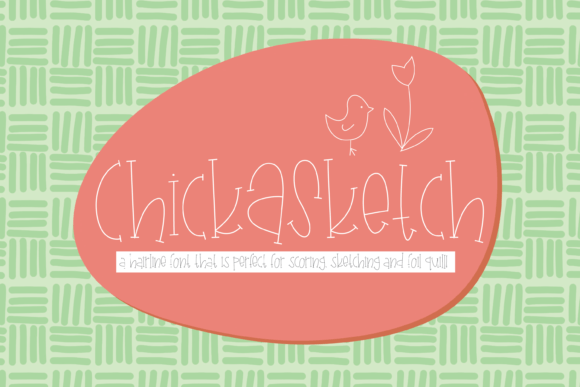
Chick a Sketch Font Free Download – Windows, Mac, Linux
Introducing the Chick a Sketch Font: Elevate Your Crafting Projects with a Unique and Versatile Design
Are you a designer or crafter looking for a font that can add a touch of whimsy and creativity to your projects? Look no further than the Chick a Sketch Font! This hairline font is ideal for a variety of crafting applications, including scoring, sketch pen, or foil quill projects. Its quirky, thin design makes it perfect for use with popular cutting machines like Glowforge, Silhouette, or Cricut.
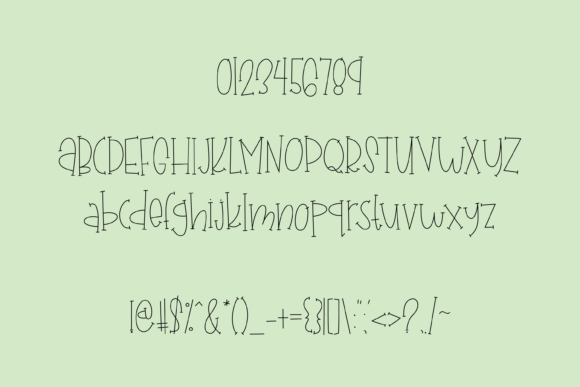
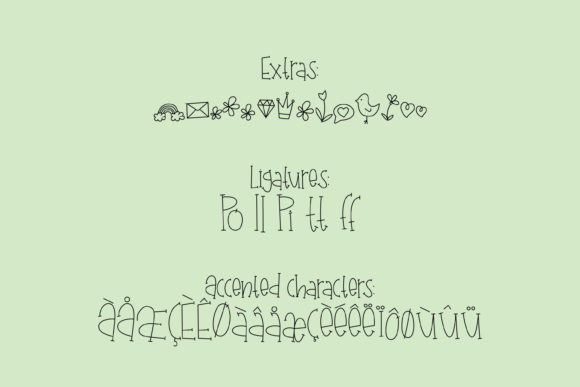
📸 Font Preview Gallery
Commercial license included • Instant download • No registration required
What Makes the Chick a Sketch Font So Special?
The Chick a Sketch Font is a unique and versatile design that offers a range of benefits for designers and crafters. Here are just a few reasons why this font stands out:
- Quirky and Thin Design: The Chick a Sketch Font features a hairline design that is both quirky and thin. This makes it perfect for adding a touch of whimsy to your projects, while also providing a clean and elegant look.
- Seamless Crafting Experience: This font is designed to work seamlessly with popular cutting machines like Glowforge, Silhouette, or Cricut. Simply set your program to “no-fill” and add a line color to achieve solid letters without the hassle of center voids.
- Versatile: The Chick a Sketch Font is perfect for a variety of crafting applications, including scoring, sketch pen, or foil quill projects. Its versatility makes it a great addition to any designer’s or crafter’s toolkit.
How to Use the Chick a Sketch Font with Your Cutting Machine
Using the Chick a Sketch Font with your cutting machine is easy! Here are the steps to follow:
- Import the Font: Import the Chick a Sketch Font into your cutting machine’s software. This can usually be done by uploading the font file to the software or by selecting the font from a list of installed fonts.
- Set Your Program to “No-Fill”: Set your program to “no-fill” to ensure that the font is cut out as a solid line, rather than a filled shape.
- Add a Line Color: Add a line color to your font to achieve a solid line. This will help to create a clean and elegant look for your project.
- Cut Out Your Design: Cut out your design using your cutting machine. The Chick a Sketch Font is designed to work seamlessly with popular cutting machines, so you can achieve professional-looking results with ease.
Project Ideas for the Chick a Sketch Font
The Chick a Sketch Font is perfect for a variety of crafting projects. Here are a few ideas to get you started:
- Signs and Banners: Use the Chick a Sketch Font to create signs and banners for parties, events, or businesses. Its quirky design makes it perfect for adding a touch of whimsy to your signs.
- Paper Crafts: Use the Chick a Sketch Font to create paper crafts like cards, invitations, or gift tags. Its thin design makes it perfect for adding a delicate touch to your paper crafts.
- DIY Decor: Use the Chick a Sketch Font to create DIY decor items like wall art, stencils, or iron-on designs. Its versatility makes it perfect for a variety of DIY projects.
Chick a Sketch Font: Access Download Now
| Font Name | Chick a Sketch Font |
| Author | kitaleigh |
| Download | Access Download Here |
Conclusion
The Chick a Sketch Font is a unique and versatile design that is perfect for designers and crafters. Its quirky, thin design makes it perfect for use with popular cutting machines like Glowforge, Silhouette, or Cricut. With its seamless crafting experience and versatile design, this font is sure to become a staple in your toolkit. So why wait? Download the Chick a Sketch Font today and start elevating your crafting projects to the next level!
Whether you’re a seasoned designer or a crafter just starting out, the Chick a Sketch Font is a great addition to your toolkit. Its ease of use, versatility, and unique design make it perfect for a variety of crafting applications. So go ahead, get creative, and see what amazing projects you can create with the Chick a Sketch Font!