Cutter Font Free Download – Windows, Mac, Linux
Cutter Font: Add a Touch of Handcrafted Magic to Your Designs
Are you tired of using the same old fonts in your designs? Do you want to add a unique and playful touch to your text? Look no further than Cutter, a stylish and artistic stacked dashed font that’s perfect for crafty designers and makers. In this article, we’ll explore the features and benefits of Cutter, and show you how to use it to take your designs to the next level.
📸 Font Preview Gallery
Commercial license included • Instant download • No registration required
What is Cutter Font?
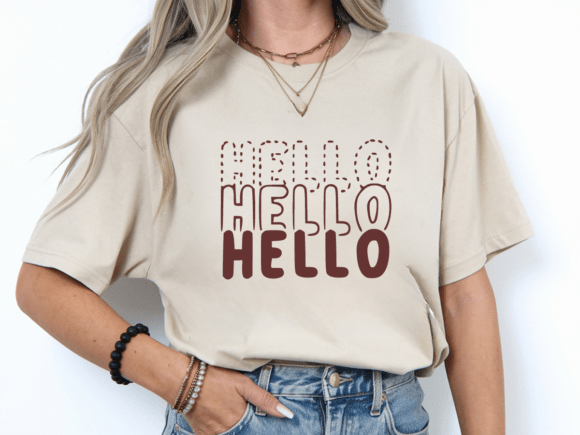
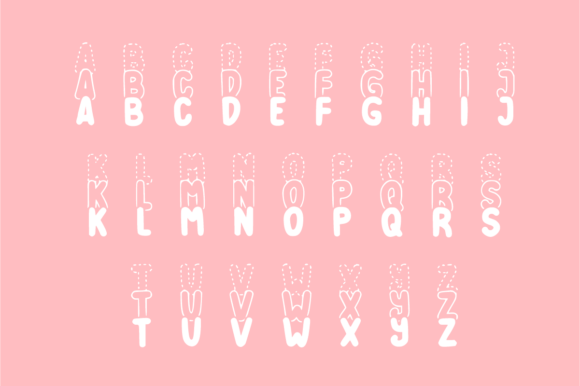
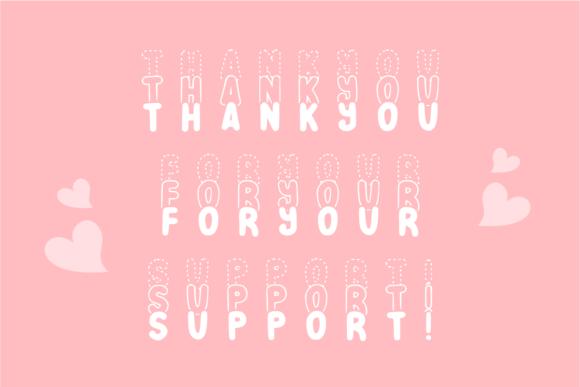
Cutter is a bold and bubbly display font that features a stylish “stacked” effect, where the top layer is accented with a playful dashed or stitched outline. This eye-catching design makes your text look like a handcrafted masterpiece, perfect for adding a touch of whimsy and creativity to your designs. Whether you’re working on school projects, vibrant posters, or cute children’s merchandise, Cutter delivers a dimensional and modern look that’s both fun and creative.
Perfect for Crafty Designers and Makers
Cutter is perfect for a wide range of design applications, including:
- Kids’ Apparel, T-shirts & Modern Streetwear: Add a playful touch to your kids’ clothing and accessories with Cutter’s fun and colorful design.
- School Projects, Teacher Resources & Posters: Make your school projects and posters stand out with Cutter’s bold and eye-catching design.
- Sticker Design, Scrapbooking & DIY Crafts: Add a touch of handcrafted magic to your stickers, scrapbooking pages, and DIY crafts with Cutter’s unique and playful design.
- Social Media Graphics & YouTube Thumbnails: Use Cutter to create eye-catching social media graphics and YouTube thumbnails that will grab attention and drive engagement.
- Branding, Logos & Creative Signage: Add a touch of creativity and whimsy to your branding, logos, and signage with Cutter’s bold and modern design.
- Cricut, Silhouette & Sublimation Projects: Use Cutter with your Cricut, Silhouette, or sublimation projects to create custom and personalized items.
- Greeting Cards & Party Invitations: Add a touch of handcrafted magic to your greeting cards and party invitations with Cutter’s playful and colorful design.
Features and Benefits of Cutter Font
Cutter offers a range of features and benefits that make it the perfect font for crafty designers and makers. Some of the key features include:
- Unique and Playful Design: Cutter’s stacked dashed design is unlike any other font on the market, making it perfect for adding a touch of whimsy and creativity to your designs.
- Bold and Eye-Catching: Cutter is a bold and eye-catching font that’s perfect for making a statement and grabbing attention.
- Easy to Use: Cutter is easy to use and can be installed on your computer in just a few minutes.
- Compatible with a Range of Design Software: Cutter is compatible with a range of design software, including Adobe Illustrator, Photoshop, and Canva.
How to Use Cutter Font in Your Designs
Using Cutter in your designs is easy. Here are a few tips to get you started:
- Experiment with Different Colors: Cutter looks great in a range of colors, so don’t be afraid to experiment and find the perfect color for your design.
- Use it with Other Fonts: Cutter can be used with other fonts to create a unique and eye-catching design.
- Add Texture and Patterns: Add texture and patterns to your design to give it a more handcrafted and DIY look.
Cutter Font: Access Download Now
| Font Name | Cutter Font |
| Author | anamalmusyaffaCreative |
| Download | Access Download Here |
Conclusion
Cutter is a unique and playful font that’s perfect for crafty designers and makers. With its bold and eye-catching design, Cutter is perfect for adding a touch of whimsy and creativity to your designs. Whether you’re working on school projects, vibrant posters, or cute children’s merchandise, Cutter delivers a dimensional and modern look that’s both fun and creative. So why not give Cutter a try and add a touch of handcrafted magic to your designs?