
Floating Shadow Font Free Download – Windows, Mac, Linux
Give Your Text a Lift with Floating Shadow Font
Are you tired of using the same old fonts in your designs? Do you want to add a touch of whimsy and playfulness to your text? Look no further than Floating Shadow Font, a unique and eye-catching typeface that’s sure to take your designs to the next level. In this article, we’ll take a closer look at Floating Shadow Font, its features, and how you can use it to add a bit of magic to your designs.
📸 Font Preview Gallery
Commercial license included • Instant download • No registration required
What is Floating Shadow Font?
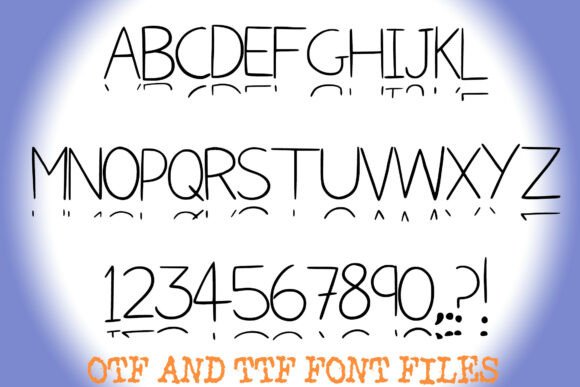
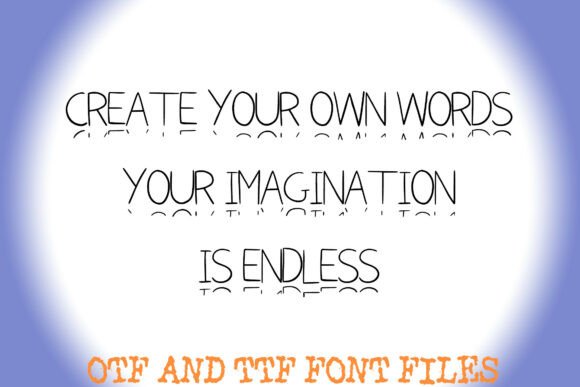
Floating Shadow Font is a playful, hand-drawn typeface that features a clean, sans-serif handwritten style paired with a signature detached “shadow” line beneath every character. This creates a fun, dimensional effect that’s perfect for adding a bit of personality to your designs. The font is designed to mimic the look of neat classroom doodles and bullet journal headers, making it ideal for designers and crafters who want to add a touch of whimsy to their work.
Key Features of Floating Shadow Font
So, what makes Floating Shadow Font so special? Here are some of its key features:
- Clean and Readable: Despite its playful design, Floating Shadow Font is highly readable, making it perfect for use in a variety of designs, from headings and titles to bullet journal headers and more.
- Hand-Drawn Style: The font features a unique, hand-drawn style that’s perfect for adding a touch of personality to your designs.
- Detached Shadow Effect: The signature detached “shadow” line beneath every character creates a fun, dimensional effect that’s sure to make your text stand out.
- OTF and TTF Files: Floating Shadow Font comes with both OTF and TTF files, making it easy to install and use on your computer.
- Capital Letters in Black Outline: The font features capital letters in black outline, which can be used to create a striking contrast with the shadow effect.
- Limited Character Set: The font only includes capital letters, numbers, and a few special characters (. ? !), which can be a limitation but also helps to maintain a clean and consistent look.
Uses for Floating Shadow Font
So, how can you use Floating Shadow Font in your designs? Here are a few ideas to get you started:
- Bullet Journal Headers: Add a touch of whimsy to your bullet journal headers with Floating Shadow Font.
- Social Media Graphics: Use Floating Shadow Font to create eye-catching social media graphics that are sure to stand out.
- Invitations and Party Decor: Add a playful touch to your invitations and party decor with Floating Shadow Font.
- Crafting and Scrapbooking: Use Floating Shadow Font to add a personal touch to your crafting and scrapbooking projects.
Tips for Using Floating Shadow Font
Here are a few tips for using Floating Shadow Font in your designs:
- Experiment with Colors: Try pairing Floating Shadow Font with different colors to create a unique and eye-catching effect.
- Use it Sparingly: Because Floating Shadow Font is a display font, it’s best to use it sparingly to avoid overwhelming your design.
- Pair it with Other Fonts: Try pairing Floating Shadow Font with other fonts to create a unique and interesting contrast.
Floating Shadow Font: Access Download Now
| Font Name | Floating Shadow Font |
| Author | squeebcreative |
| Download | Access Download Here |
Conclusion
Floating Shadow Font is a unique and eye-catching typeface that’s perfect for designers and crafters who want to add a touch of whimsy to their designs. With its clean, sans-serif handwritten style and signature detached “shadow” line, Floating Shadow Font is sure to make your text stand out. Whether you’re creating bullet journal headers, social media graphics, or crafting and scrapbooking projects, Floating Shadow Font is a great choice. So why not give it a try and see how it can add a bit of magic to your designs?