
Fourcolor Font Free Download – Windows, Mac, Linux
Introducing Fourcolor Font: Add a Pop of Color to Your Designs
Are you tired of using the same old fonts in your designs? Do you want to add a touch of excitement and fun to your projects? Look no further than the Fourcolor Font, a unique and vibrant font that combines a brush-style texture with matching colors. In this article, we’ll explore the features and benefits of Fourcolor Font, and show you how to make the most of this amazing design tool.
📸 Font Preview Gallery
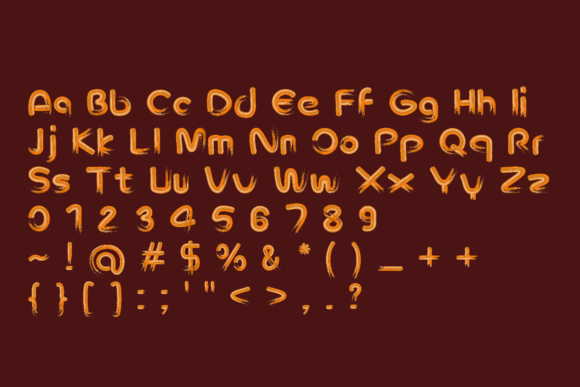
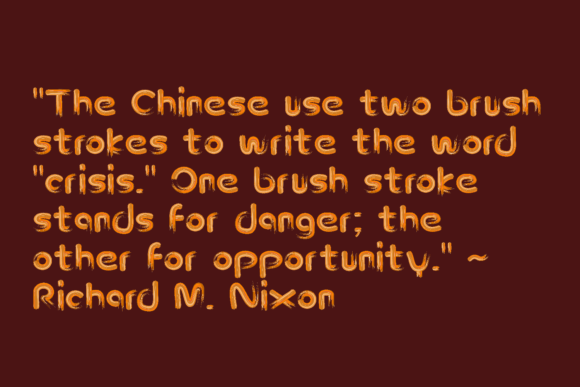
Commercial license included • Instant download • No registration required
What is Fourcolor Font?
Fourcolor Font is a color font that uses the Opentype-SVG format, making it compatible with a range of design software, including PhotoShop, Illustrator, Silhouette, and Inkscape. This font is perfect for designers and crafters who want to add a personal touch to their work. With its brush-style texture and matching colors, Fourcolor Font creates a powerful appeal that’s sure to grab attention.
Key Features of Fourcolor Font
- Unique Brush-Style Texture: Fourcolor Font features a distinctive brush-style texture that adds a touch of handmade charm to your designs.
- Matching Colors: The font comes with matching colors that create a beautiful, cohesive look.
- Opentype-SVG Format: Fourcolor Font uses the Opentype-SVG format, making it compatible with a range of design software.
- Compatible with PhotoShop, Illustrator, Silhouette, and Inkscape: You can use Fourcolor Font in your favorite design software.
How to Use Fourcolor Font
Using Fourcolor Font is easy. Simply download the font files and install them on your computer. You can then access the font in your design software and start creating amazing projects. Here are a few tips to get you started:
- Experiment with Different Colors: Fourcolor Font comes with matching colors, but you can also experiment with different color combinations to create a unique look.
- Use it in Combination with Other Fonts: Fourcolor Font works well with other fonts, so feel free to get creative and combine it with your favorite fonts.
- Perfect for Crafting and DIY Projects: Fourcolor Font is perfect for crafters and DIY enthusiasts who want to add a personal touch to their projects.
Important Compatibility Notes
Before purchasing Fourcolor Font, it’s essential to note that the OTF and TTF files are not compatible with Cricut. If you’re a Cricut user, you may want to consider alternative font options. However, if you use PhotoShop, Illustrator, Silhouette, or Inkscape, you’ll be able to use Fourcolor Font with ease.
Getting the Most out of Fourcolor Font
To get the most out of Fourcolor Font, be sure to check out our Ultimate Font Guide. This comprehensive guide provides everything you need to know about using color fonts, including installation instructions, troubleshooting tips, and creative ideas for using Fourcolor Font in your designs.
Fourcolor Font: Access Download Now
| Font Name | Fourcolor Font |
| Author | murisa.studio |
| Download | Access Download Here |
Conclusion
Fourcolor Font is an exciting and versatile font that’s perfect for designers and crafters who want to add a pop of color to their projects. With its unique brush-style texture and matching colors, this font is sure to create a powerful appeal. Whether you’re creating digital designs or handmade crafts, Fourcolor Font is the perfect choice. So why wait? Download Fourcolor Font today and start adding a touch of fun and excitement to your designs!
FAQs
- What file format is Fourcolor Font?
- Fourcolor Font is available in Opentype-SVG format.
- What design software is Fourcolor Font compatible with?
- Fourcolor Font is compatible with PhotoShop, Illustrator, Silhouette, and Inkscape.
- Can I use Fourcolor Font with Cricut?
- No, the OTF and TTF files of Fourcolor Font are not compatible with Cricut.