
Gingerman Font Free Download – Windows, Mac, Linux
Introducing the Gingerman Font: A Playful and Artistic Typeface for Designers and Crafters
The Gingerman Font is a delightful and whimsical typeface that has captured the hearts of designers and crafters alike. Its playful and artistic feel makes it an ideal choice for a variety of design projects, from children’s books and posters to invitations, greeting cards, and more. In this article, we’ll explore the features and benefits of the Gingerman Font, as well as its compatibility with popular design software and cutting machines.
📸 Font Preview Gallery
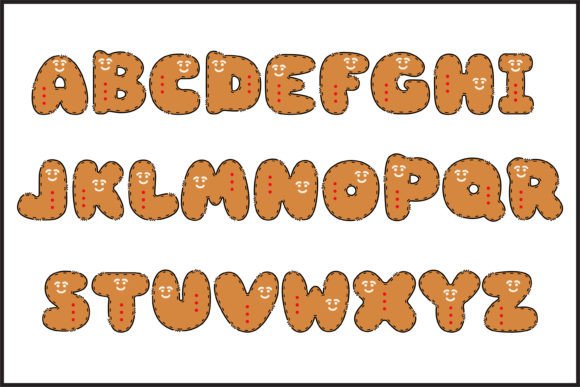
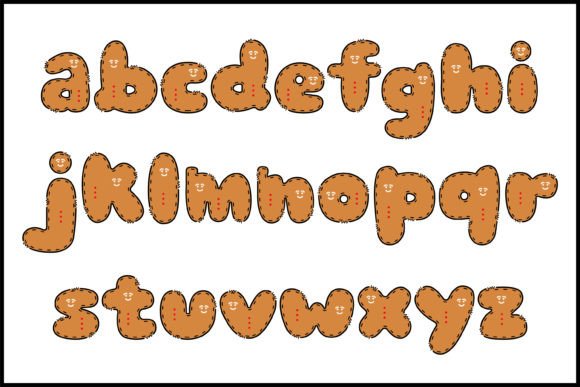
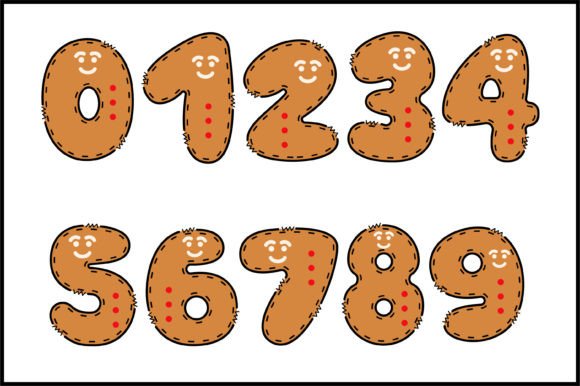


Commercial license included • Instant download • No registration required
A Font that’s Full of Character
The Gingerman Font is a unique and eye-catching typeface that’s perfect for designs that require a touch of personality. Its playful and artistic feel is achieved through its distinctive letterforms, which are both whimsical and elegant. The font comes in two versions: a black version and a color version. The black version is ideal for designs that require a bold and striking look, while the color version offers a more vibrant and playful feel.
Perfect for Children’s Books and More
Children’s books often require fonts that are not only easy to read but also engaging and fun. The Gingerman Font is an excellent choice for children’s books, as its whimsical and colorful design creates an immersive reading experience for young audiences. The font is also suitable for a range of other design projects, including posters, invitations, greeting cards, and more. Its playful and artistic feel makes it an excellent choice for designers who want to add a touch of personality to their work.
Compatibility with Design Software and Cutting Machines
The Gingerman Font is compatible with a range of popular design software, including PhotoShop, Illustrator, Silhouette, and Inkscape. However, it’s essential to note that the color version of the font is only compatible with certain design programs. The OTF and/or TTF files of the color version are not compatible with Cricut Design Space and other cutting machines. But don’t worry, the black version of the font is fully compatible with Cricut Design Space and other cutting machines, making it an excellent choice for crafters who use these machines.
Getting the Most Out of the Gingerman Font
To get the most out of the Gingerman Font, it’s essential to understand how to use it effectively. Our Ultimate Font Guide provides detailed information on how to use this type of font, including tips on installation, troubleshooting, and more. Whether you’re a seasoned designer or a crafter just starting out, our guide will help you unlock the full potential of the Gingerman Font.
Tips for Using the Gingerman Font
Here are a few tips for using the Gingerman Font in your designs:
- Use the font in designs that require a playful and artistic feel, such as children’s books, posters, and invitations.
- Experiment with different colors and textures to add depth and interest to your designs.
- Pair the font with other playful and artistic fonts to create a unique and eye-catching look.
- Use the black version of the font for designs that require a bold and striking look, and the color version for designs that require a more vibrant and playful feel.
Gingerman Font: Access Download Now
| Font Name | Gingerman Font |
| Author | Veil |
| Download | Access Download Here |
Conclusion
The Gingerman Font is a delightful and versatile typeface that’s perfect for designers and crafters who want to add a touch of personality to their work. Its playful and artistic feel makes it an excellent choice for a range of design projects, from children’s books and posters to invitations and greeting cards. With its compatibility with popular design software and cutting machines, the Gingerman Font is an excellent addition to any designer’s or crafter’s toolkit.