
Green Leopard Font Free Download – Windows, Mac, Linux
Unleash the Wild Side of Your Designs with the Green Leopard Font
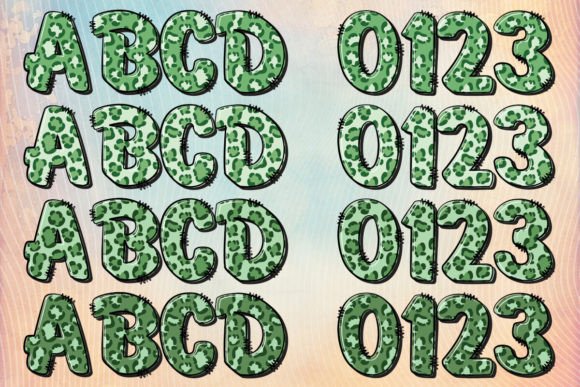
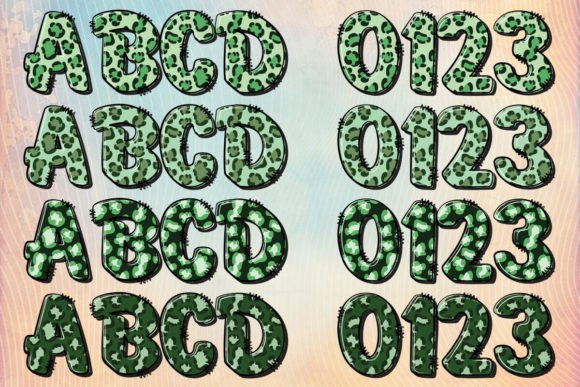
Are you tired of using the same old fonts in your designs? Do you want to add a touch of wilderness and a robust visual impact to your projects? Look no further than the captivating Green Leopard font. Inspired by the exotic allure of leopard skin patterns, this unusual alphabet is intricately designed to mimic the intricate patterns found on real leopard and cheetah skin.
📸 Font Preview Gallery

Commercial license included • Instant download • No registration required
A Font that Roars Style, Strength, and Substance
The Green Leopard font is not just a typeface, it’s an experience. Each letter is carefully crafted to bring the wild charisma of the leopard to your designs. Whether you’re working on a project for St. Patrick’s Day or just want to add a dash of green to your designs, this font is an ideal choice. The verdant hue and distinctive patterns of the Green Leopard font carry an Irish charm, symbolically capturing the spirit of St. Patrick’s Day.
Compatibility and Versatility
The Green Leopard font comes in two versions: black and color. The black version is compatible with Cricut Design Space and other cutting machines, making it perfect for crafters and designers who work with cutting machines. However, the color version is only compatible with certain design programs, including PhotoShop, Illustrator, Silhouette, and Inkscape. The OTF and/or TTF files of the color version are not compatible with Cricut.
Tips for Using the Green Leopard Font
To get the most out of the Green Leopard font, here are a few tips:
- Use the black version for cutting machine projects, such as vinyl signs, iron-on designs, and paper crafts.
- Use the color version for digital designs, such as social media graphics, posters, and flyers.
- Experiment with different colors and patterns to make your designs stand out.
- Pair the Green Leopard font with other bold and playful fonts for a unique look.
How to Use the Color Version with Your Favorite Design Programs
If you’re new to using color fonts, don’t worry. Here’s a brief guide on how to use the Green Leopard font with your favorite design programs:
- PhotoShop: Simply install the OTF file and select the font from the font menu. You can then use the font with its color layers intact.
- Illustrator: Install the OTF file and select the font from the font menu. You can then use the font with its color layers intact.
- Silhouette: Install the OTF file and select the font from the font menu. You can then use the font with its color layers intact.
- Inkscape: Install the OTF file and select the font from the font menu. You can then use the font with its color layers intact.
Green Leopard Font: Access Download Now
| Font Name | Green Leopard Font |
| Author | october.store |
| Download | Access Download Here |
Conclusion
The Green Leopard font is a unique and captivating typeface that’s sure to add a touch of wilderness and a robust visual impact to your designs. With its intricate patterns and verdant hue, this font is perfect for designers and crafters who want to make a statement. Whether you’re working on a project for St. Patrick’s Day or just want to add some excitement to your designs, the Green Leopard font is an ideal choice. So why wait? Download the Green Leopard font today and unleash the wild side of your designs!