
Happy Leaves Font Free Download – Windows, Mac, Linux
Introducing Happy Leaves Font: Add a Touch of Whimsy to Your Designs
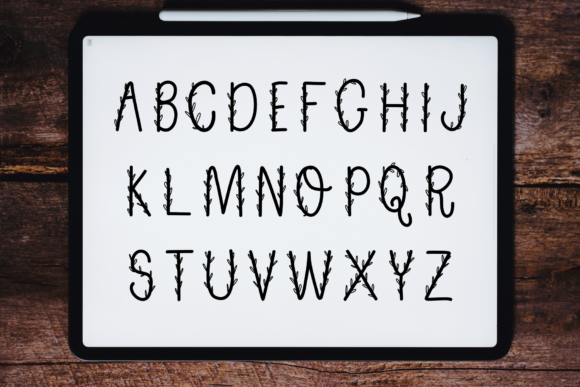
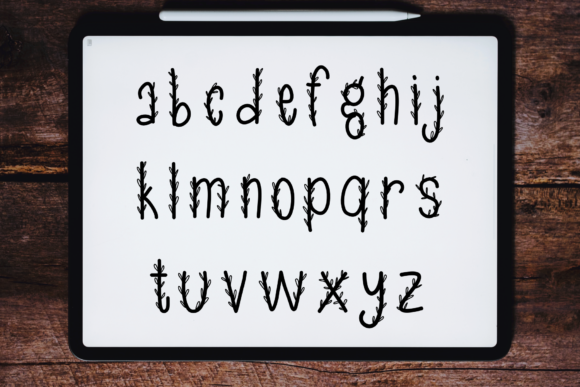
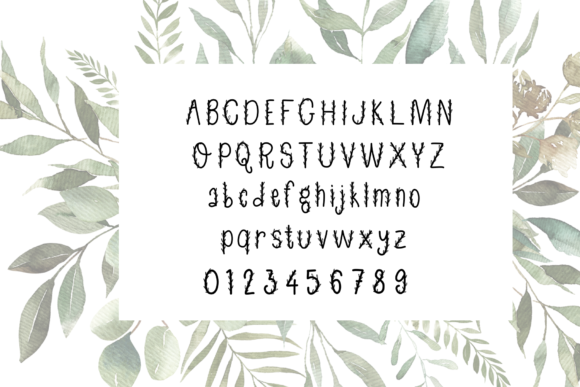
Are you tired of using the same old fonts in your designs? Do you want to add a touch of personality and whimsy to your creative projects? Look no further than Happy Leaves Font, a simple and neat lettered handwritten font featuring tiny leaves. This charming font is perfect for designers and crafters who want to bring a sense of joy and playfulness to their work.
📸 Font Preview Gallery

Commercial license included • Instant download • No registration required
What is Happy Leaves Font?
Happy Leaves Font is a unique and eye-catching font that combines elegant lettering with tiny leaves. The font is designed to be easy to read and use, making it perfect for a variety of creative projects, from handmade cards and invitations to digital graphics and branding materials. The leaves add a touch of nature and whimsy to the font, making it stand out from more traditional fonts.
Features of Happy Leaves Font
- Simple and Neat Lettering: The lettering in Happy Leaves Font is simple, yet elegant, making it easy to read and use in a variety of contexts.
- Tiny Leaves: The tiny leaves that adorn each letter add a touch of whimsy and playfulness to the font, making it perfect for designers and crafters who want to add a personal touch to their work.
- Handwritten Style: The font has a handwritten style that gives it a personal and organic feel, making it perfect for projects where you want to add a touch of personality.
- Easy to Use: Happy Leaves Font is easy to install and use, making it accessible to designers and crafters of all skill levels.
How to Use Happy Leaves Font
Happy Leaves Font is a versatile font that can be used in a variety of creative projects, including:
- Handmade Cards and Invitations: Add a personal touch to your handmade cards and invitations with Happy Leaves Font.
- Digital Graphics: Use Happy Leaves Font in your digital graphics, such as social media graphics, blog headers, and more.
- Branding Materials: Use Happy Leaves Font in your branding materials, such as logos, business cards, and letterheads.
- Crafting Projects: Add a touch of whimsy to your crafting projects, such as scrapbooking, journaling, and more.
Why Choose Happy Leaves Font?
There are many fonts available that feature leaves or other natural elements, but Happy Leaves Font stands out from the crowd for several reasons:
- Unique Design: The combination of simple lettering and tiny leaves makes Happy Leaves Font a unique and eye-catching font that will add a touch of personality to your designs.
- Easy to Read: Despite its whimsical design, Happy Leaves Font is easy to read, making it perfect for use in a variety of contexts.
- Versatile: Happy Leaves Font can be used in a wide range of creative projects, from handmade cards to digital graphics.
Happy Leaves Font: Access Download Now
| Font Name | Happy Leaves Font |
| Author | CSDesign |
| Download | Access Download Here |
Conclusion
If you’re looking for a font that will add a touch of whimsy and personality to your designs, look no further than Happy Leaves Font. With its simple and neat lettering, tiny leaves, and handwritten style, this font is perfect for designers and crafters who want to bring a sense of joy and playfulness to their work. Whether you’re creating handmade cards, digital graphics, or branding materials, Happy Leaves Font is sure to make your designs come alive!
Get Happy Leaves Font
Ready to add Happy Leaves Font to your design toolkit? You can download the font from [insert link]. Once you’ve downloaded the font, you can install it on your computer and start using it in your designs right away.
Tips and Inspiration
Need some inspiration for using Happy Leaves Font in your designs? Here are a few tips to get you started:
- Pair with Other Fonts: Pair Happy Leaves Font with other fonts to create a unique and eye-catching design.
- Use in Combination with Images: Use Happy Leaves Font in combination with images, such as photographs or illustrations, to add a touch of personality to your designs.
- Experiment with Colors: Experiment with different colors and textures to add depth and interest to your designs.